
Submitted:
13 April 2025
Posted:
14 April 2025
You are already at the latest version
Abstract
The use of technology in mental health programs has significantly increased access and interaction for users and psychology care. There is a newer platform known as BetterMood that focuses on making user interaction easier and making the registration of users requiring mental health care less complicated. Here, the work of research describes the system architecture of BetterMood, that is, the user registration procedure, and presents a sequence diagram describing the used verification mechanisms. Through the application of a formal validation process, BetterMood guarantees data accuracy and protection, ultimately providing an uninterrupted and trusted user experience. The results demonstrate the significance of clearly defined system interactions in instilling user trust and usability in digital mental health interventions.
Keywords:
health application
; software development
; UX Design
1. Introduction
Mental health applications have become more critical in providing low-cost and effective services to every individual across the world. As technology advances, it has become a critical component of the development process to have an unproblematic user interface in such systems. Among the critical components of any health system running on software is the system for user registration, as it is the first point of entry for users to obtain access to vital mental health services [1].
BetterMood is a mental health application that seeks to enhance user accessibility and engagement through a better registration system. The system is a structured sequence of interactions between the users and the verification server to determine data accuracy and security. This paper examines the registration model of the system, which incorporates validation processes that secure personal information and enhance user trust. By looking at the sequence diagram of BetterMood's sign-up process, we would like to illustrate how powerful a good-designed authentication mechanism can be to foster a secure and user-friendly environment [2,3,4].
The following sections provide a comprehensive account of the system's registration procedure, including its sequence diagram as well as how verification servers centrally facilitate data integrity. From this study, our aim is further to enhance the creation of wholesome digital mental health solutions with a focus on user experience and security[3].
2. Literature Review
The recent advent of online mental health care has predominantly changed access to mental psychological care with scalable and cheaper methods of managing mental well-being. The pace at which technologies are developing has enabled individuals to gain access to mental health services through mobile application and web platforms, reducing dependency on traditional face-to-face treatment. Mental health apps (MHAs) have been a valuable tool in modern health care, accessible to individuals who would otherwise not be able to have access to professional mental health care due to geographical, cost, or social restrictions. The use of the apps has grown extensively, as they are capable of providing self-help mechanisms, connecting users with licensed therapists, and providing tracking tools for monitoring mental health progress. These applications have been particularly helpful in their encouragement of early intervention, lowering the stigma associated with seeking professional help, and encouraging long-term engagement with mental health support systems[5,6,7,8].
One of the most important aspects of mental health apps is user experience (UX), which is vital to their success. An easy and interactive interface elicits user trust and results in frequent use of the application. There are several aspects that help make UX successful, including ease of use, good visual layout, personalized content, and clear guidance on how to use the application. End users will be more inclined to participate in MHAs in which UX design is ongoing and individualized towards addressing their specific needs. In contrast, poor UX design, i.e., making navigation more complex, low levels of personalization, or ambiguously presented directions, would discourage them from and eschew use, thereby suppress its intended function in shaping the trajectory of mental health outcome. Human-computer interaction research identifies the importance of usability in health applications due to the fact that usability enhances compliance and encourages users to embrace digital mental health interventions in their daily lives[9,10,11,12].
BetterMood, a newly developed mental health application, emphasizes enhancing user registration and fortifying verification processes to offer a secure and seamless experience. In contrast to existing platforms like Headspace and Woebot, BetterMood employs state-of-the-art technological components to optimize mental health care. Platforms like Headspace focus on mindfulness and meditation, while Woebot uses AI and CBT to provide chatbot-based interventions. BetterMood is unique in that it emphasizes system interactions as well as formal validation to make sure users receive tailored and safe mental health treatment. By incorporating AI-driven features and machine learning algorithms, BetterMood tailors’ interventions based on user behavior and mental health needs, thus improving the overall effectiveness of digital therapy.
Effective registration is very important in online health platforms because it has a significant impact on users' engagement and retention. According to studies, complex onboarding procedures discourage people from going forward with an app, but computerized verification mechanisms build confidence and security. Systematic verification methods are applied by BetterMood to ensure users' information is intact, hence making the system more credible. Through an automated verification process, the website eliminates false registrations and offers more secure protection for personal information. The feature is particularly important in mental health applications, where confidentiality and trust are most important in developing a safe online community for users[13].
With increased concerns about data security and protection, safeguarding sensitive information in mental health applications is now a top priority. Regulatory frameworks such as the General Data Protection Regulation (GDPR) and the Health Insurance Portability and Accountability Act (HIPAA) give standards for secure handling of personal health data. Compliance with these standards is paramount to user data security, against unauthorized access, and to maintaining the integrity of electronic health platforms. BetterMood integrates these controls within its system, employing sound encryption protocols and robust access controls to protect users' personal information. Protecting data not only serves to secure individual information but also fosters trust among users, encouraging long-term usage of the system[14,15].
Well-defined interactions within systems contribute extensively to maintaining user retention and satisfaction. If workflow within systems are well defined, intuitive, and user-centered, individuals will be kept active on the platform. Cognitive load—caused by excessively difficult or poorly presented system interactions—could have adverse impacts on user experience and lessen the effectiveness of online mental health treatments. Organized system approach by BetterMood makes ease of navigation more achievable, permitting individuals to be able to gain support services easier, track progress with their own mental health, and interact with virtual therapists with less difficulty. Minimizing usage barriers to achieve, the system increases opportunities for extended duration usage and superior mental health outcomes [16].
The successful synergy of UX design, secure data management, and well-specified system interactions is essential in developing effective mental health apps. BetterMood's integrated methodology abides by best practice in digital mental health interventions, making the application trustworthy, easy to use, and engaging. The effectiveness of these applications hinges on the integration of technological advancements, regulatory compliance, and people-cantered design. As digital mental health continues to develop, further research is required to assess long-term user retention, therapeutic effectiveness, and the potential integration of emerging technologies, such as virtual reality (VR) and augmented reality (AR), into mental health interventions. By continued development of digital mental health platforms, researchers and developers can realize their full potential, ultimately resulting in enhanced mental health care and accessibility for individuals worldwide [17].
3. Proposed Methodology
The proposed methodology for the development and implementation of the BetterMood system is a structured one with focus on the key features such as user registration, authentication, payment gateway, activity workflows, and UI/UX. The methodology is designed to ensure effective, secure functionality, and simplicity of use of the system[18,19,20]. The system is based on a client-server model in which the client interface interacts with many backend services, including registration system for user onboarding, authentication system for secure login, payment system for subscription processing, assessment module for mental health screening, and recommendation engine for personalization[21,22,23].
Regarding the deployment of sequence diagram, user registration involves the submission of personal information by the user, which is then validated by the system. After validation, the user moves on to password creation, which is stored securely. The user authentication process involves credential authentication, granting access upon successful login and notifying the user upon failure. Payment processing is initiated upon successful login, where users select a payment method and input payment details, with confirmation or failure messages given depending on the payment status [24].
The activity diagram workflow defines distinct user roles with distinct workflows. Users register, log in, pay for subscriptions, complete assessments, and view customized content. Admins manage user information and monitor interaction with users, while professionals conduct assessments and provide customized interventions. Teachers instruct life-skills classes, and companies manage financial transactions and job processes.
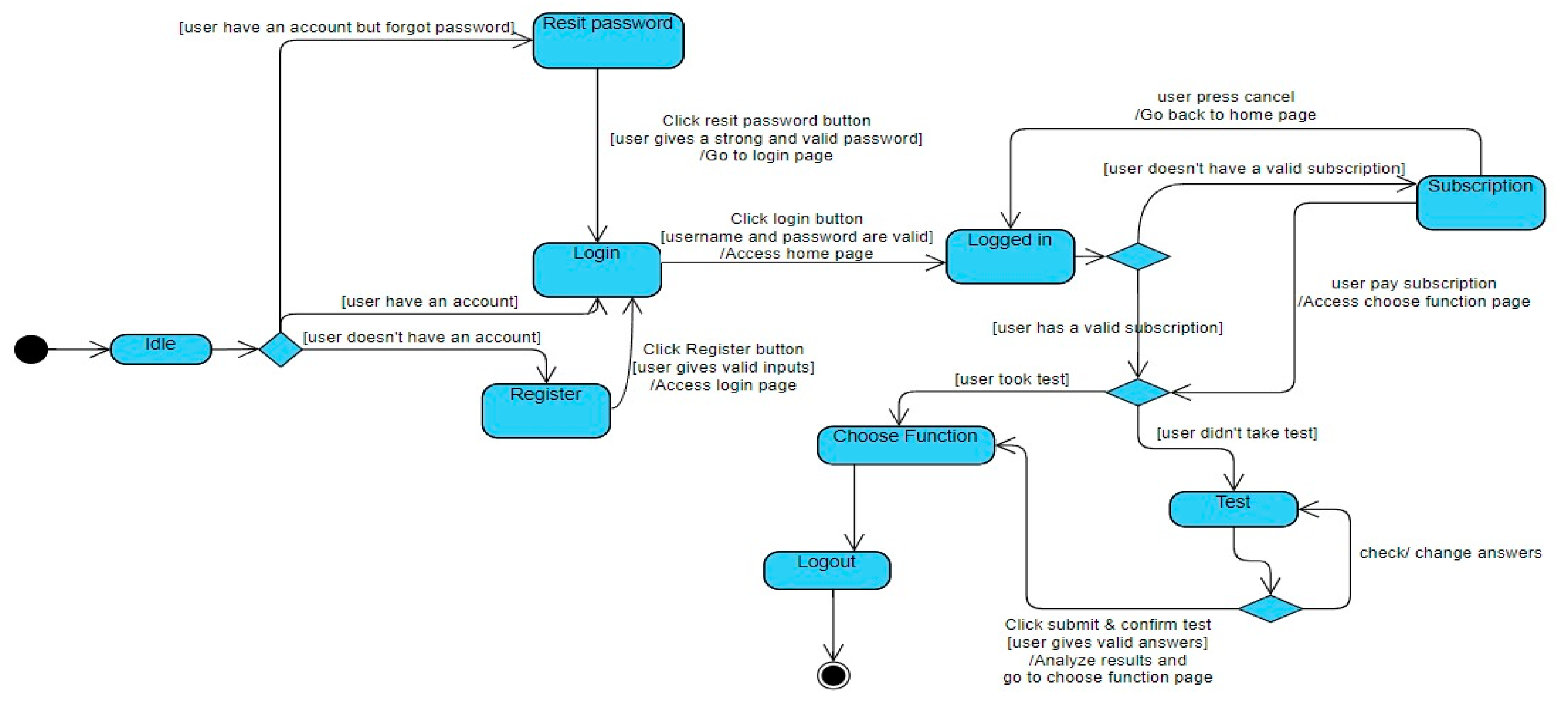
State chart diagram implementation uses a state-based mechanism to manage user movement from one state to another, like idle, registration, login, reset password, subscription verification, assessment, feature selection, and logout states. These movements make user interactions with the system smooth and seamless. The UI/UX design cycle includes a user-preference language-setting functionality, a normalized login screen for simplicity, and an initial user assessment to determine mental health disorders. The app gives personalized exercises according to the assessment results to ensure maximum interaction with the user.
This Sequence Diagram shows the conversation between the user and various systems, as outlined in Figure 1. The process initiates when the user invokes the system, which prompts the registration system to establish the registration screen. The system then requests the user to provide personal information (P-Information). Once entered, the system passes the P-Information to a validation server for checking, employing a different framework to handle the different outcomes of this step. In the event that the personal data is valid, the validation server sends a validity confirmation to the registration system, which then requests the user to set up a password. The system passes this password to the verification server for checking its format. If the personal data is invalid, the validation server sends a failure message, and the registration system informs the user that the registration failed.
If the personal data is valid, the password configuration phase follows. The verification server checks the password structure, leading to another alternative framework. If the password format is correct, the verification server sends the correct format back to the registration system, which forward the password to the storage system for storage. The storage system saves the password and sends a successful storage response back to the registration system, which finally notifies the user with a successful registration. But if the password is in an incorrect format, the verification server will return an error message, and the registration system will inform the user that the registration has failed.
This Sequence Diagram is separated into two parts: the user login process and the user payment process as mentioned in figure 2. The first part is about the user login process. When the user opens the system, the login screen is set. The system then asks the user to input their login password. After the user enters the password, the login system sends this data to the authentication server for verification. The authentication server then retrieves the login password from the storage system and sends it back to the authentication server. Another framework deals with two possibilities: if the password is accurate, the verification server checks a successful match, and the login system notifies the user of successful login. If the password is invalid, the verification server informs the failure to the login system, and the login system informs the user back that the login has failed.
The second part is the payment process of the user. Upon login success, the login system requests the user to proceed with the payment. The user can perform either continue payment (willing payment) or not continue (unwilling payment). Another model is used here as well. If the user doesn't want to pay, the system servers are closed down. If the user wants to pay, then the payment mechanism requests him to select the payment mode. Once the user enters the payment mode, he is prompted to enter his payment password. Another alternative model is used for password authentication: if the password is correct, the bank system sends the correct password to the payment system, and the payment system informs the user that the payment was successful. If the password is incorrect, the bank system informs the payment system, and the payment system informs the user that the payment failed.
Figure 3 mention the Activity Diagram of user, professional, teacher, and company in this app. The user begins by logging in to the login page, where they may log in or sign up. If the login is successful, the user is redirected to the home page. If the login credentials are incorrect, the user is prompted to try logging in again. There is also a reset button for users who forgot their password. For users without registration, the user may become a registered account by registering. Once the registration is complete, the user is able to specify the system language and proceed to the login page and fill in the username and password. In addition to logging in, the user is prompted to pay the subscription fee if the user intends to carry on. When the user pays the subscription fee, the user will be able to access the home page. Otherwise, they will need to take an assessment if necessary. Depending on the subscription status and assessment outcome, the user can utilize various functions, such as Personalized Functions, Life-Skills Courses, and Community Support. Finally, the user selects a function to continue.
For the admin, their role is to handle user data and maintain the chat environment clean to allow for seamless interaction within the system. The professional's role involves conducting assessments, providing personalized courses, and providing targeted interventions to users. Teachers are hired to instruct life-skills courses, assisting with the education aspect of the platform. Companies hire workers, accept payments, and maintain salaries to ensure the employment and financial aspect of the system is maintained smoothly.
The below State Chart Diagram in figure 4 shows the flow of user interactions within the app, guiding them from the initial state (Idle) through various functionalities such as Login, Registration, Password Reset, Subscription Payment, and Test-taking. Below is a step-by-step description of the flow:
The process begins at the state "Idle" when the user is yet to take any action. When the user is not registered, he/she is in the state "Registration Process" and can register by clicking the register button and providing proper details. Once registered, the user can go to the login page.
If the user has an existing account and has memorized the credentials, he proceeds to the "Login Process" state. When he submits correct credentials and clicks on the login button, the user gets logged in and redirected to the home page.
If the user exists but has lost their password, they can provide the "Reset Password" state. There, they can press the "Reset Password" button, enter a strong and correct password, and after resetting successfully, they are redirected to the login page.
Once logged in, the system checks if the user is subscribed in the "Post-Login Decisions" state. If the user is not subscribed, they must pay to see the functions page. If they are subscribed, they can either choose a function or proceed to take a test.
When in the "Testing Path" status, when the user clicks on test taking, there are two possibilities. If the user has already taken the test, he/she can go directly for function selection. If the user has not taken the test, he/she needs to take the test, submit his/her answers, and when the system has finished analysing the results, he/she is redirected to the function selection page. Finally, in the "Function Access and Logout" state, the user can apply the chosen function or, having completed the test, access his wanted feature. Once logged in, at any moment, the user can log out as shown in Figure 5, 6, and figure 7.
Figure 5.
User after choosing English Language.
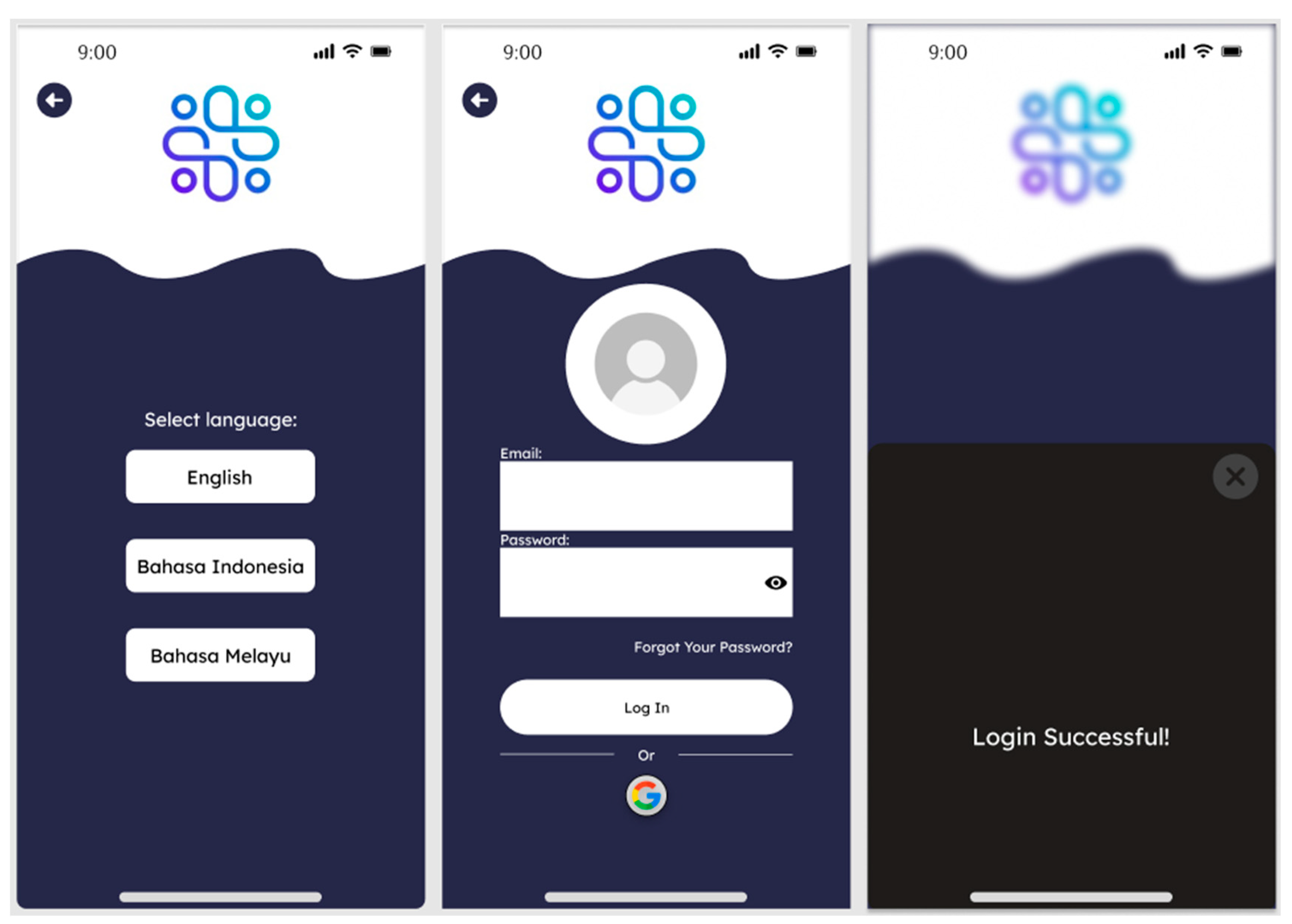
Figure 6.
User after choosing Bahasa Indonesia Language.
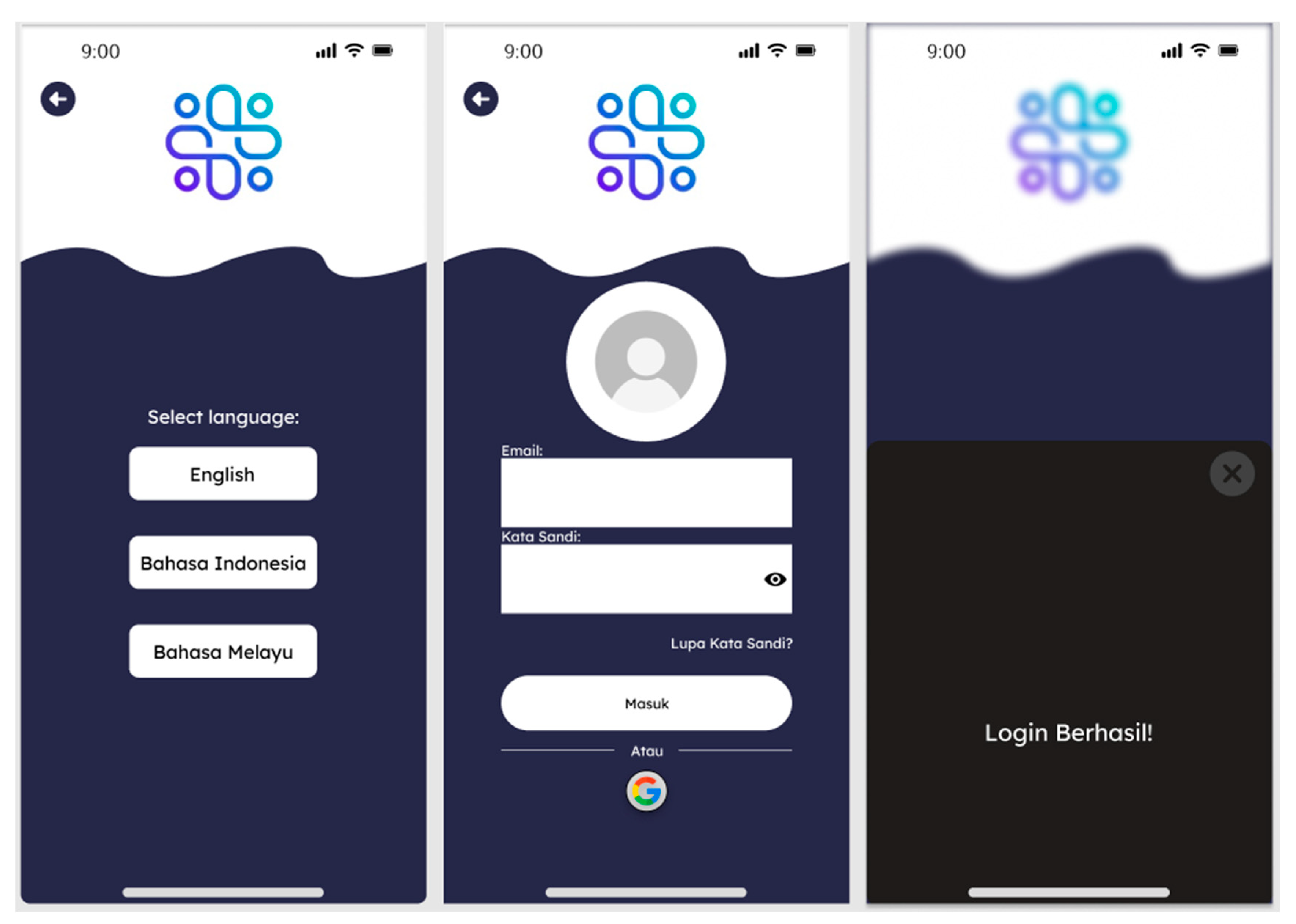
Figure 7.
User after choosing Bahasa Malay Language.
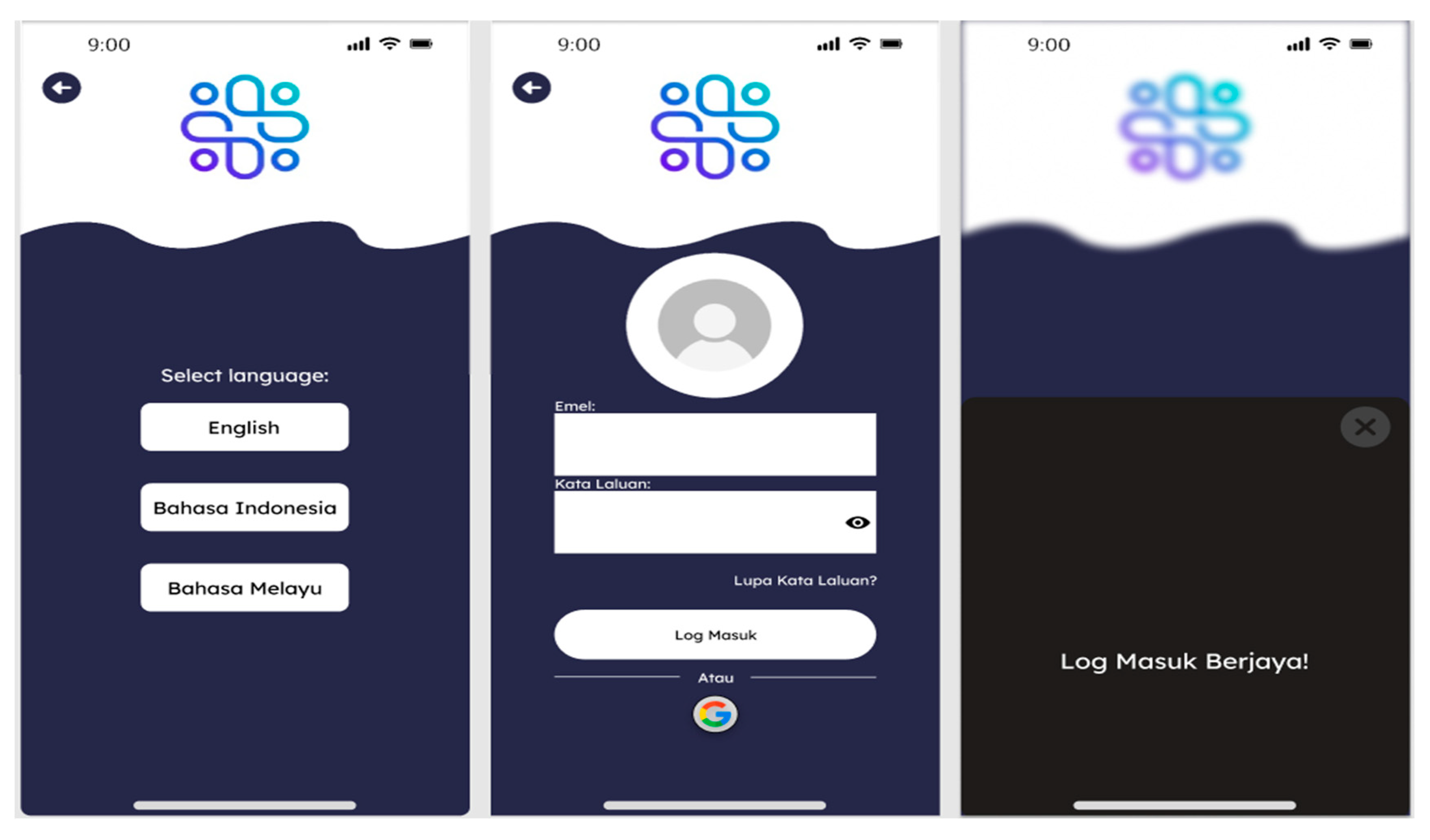
The above is the use case when the user selects the language, in designing this part of the user interaction design plan, we have done the following user experience design points:
- The language selection page is brief. The purpose of this page is concisely evident with a brief and to-the-point cue "Select Language" and a list of options. Providing language options makes the application more accessible to different groups of users.
- The login page adheres to a user-friendly format. The login page assumes a standard pattern design with the "Email" and "Password" fields properly labelled for clarity. System status is present briefly, the password field has an eye symbol indicating that users can view their passwords to avoid errors, which is a great feature. Other login options with the availability of other login options such as Google provides users with convenient options to log in to their accounts. The successful login message has a clear affirmation, and the background of the notification is a dark color that contrasts with the front screen, which makes it stand out as an important system status message.
- Strong consistent branding is used. The logo is positioned consistently on each screen, developing the brand identity. The same colour scheme is used, and the wave design is visually attractive, creating a unique and memorable visual theme. The use of known icons (Eyes for password visibility, Google for other logins) is best practice for intuitive design.
- Simple navigation is used, with a back button on the first screen and a close button on the success notification, which indicates a linear navigation flow for the user.
User Assessment Diagram
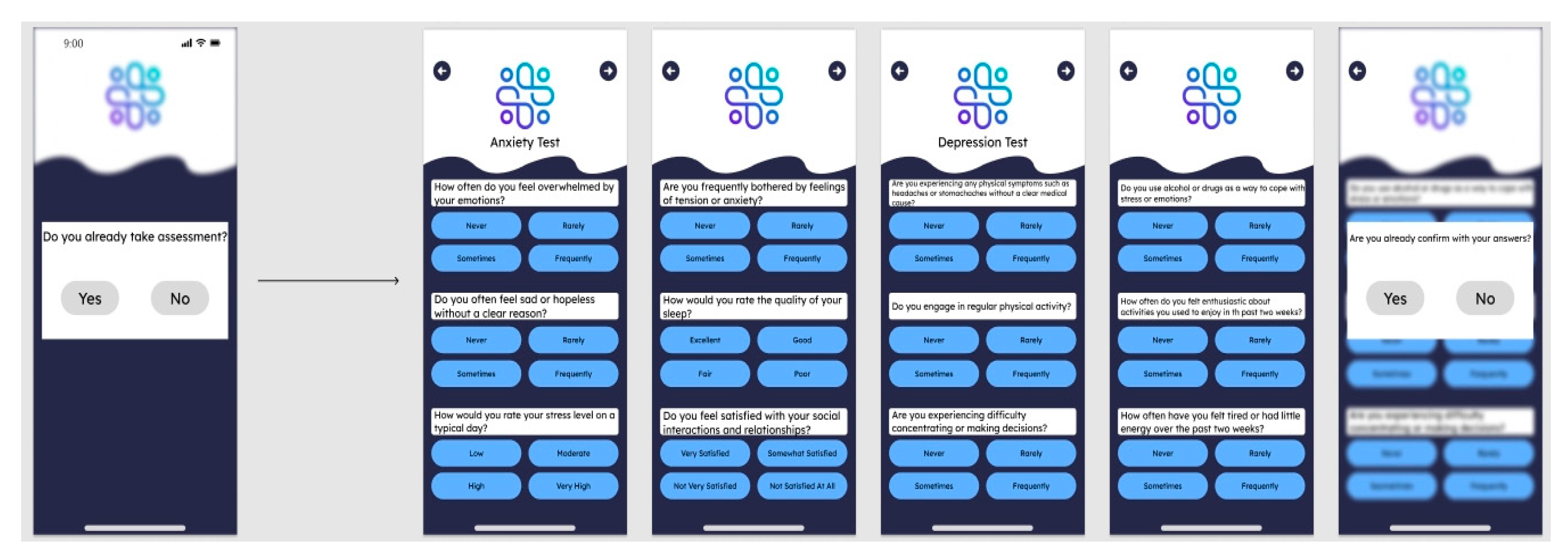
Above is the scenario when the user takes the first test/evaluation at subscription to the app in figure 8. In designing this part of the user interaction design solution, we have made the following user experience design points:
- System informs the user on the first page if they have already provided an assessment or not. This avoids repetitive tasks, saving the user's time and effort. Assessment enables users to know their mental illness problem so that professionals can give them a recommendation to solve their problem and how to maintain.
- The layouts of the questionnaires for both Anxiety and Depression Tests are identical, and this contributes to usability. Users need to learn the layout only once which is the standard method for this type of test and allows users to make clear choices.
- Each question is highlighted visually, and this does not permit users to skip questions unintentionally. The question answer buttons are sufficiently large for touch operation.
- The questions are expressed in simple, understandable language, which is very important for proper self-testing. The layout is readable, with effective use of white space.
- Users are asked to verify their answers after completing the test, with the opportunity to review and, if necessary, revise their answers.
- 6. Color contrast is sufficient to give readability and meets accessibility for visually impaired users. The questions are concise and relevant to the users.
Figure 8.
Users must undertake an assessment before going to the main page.
Recommend Exercises Diagram
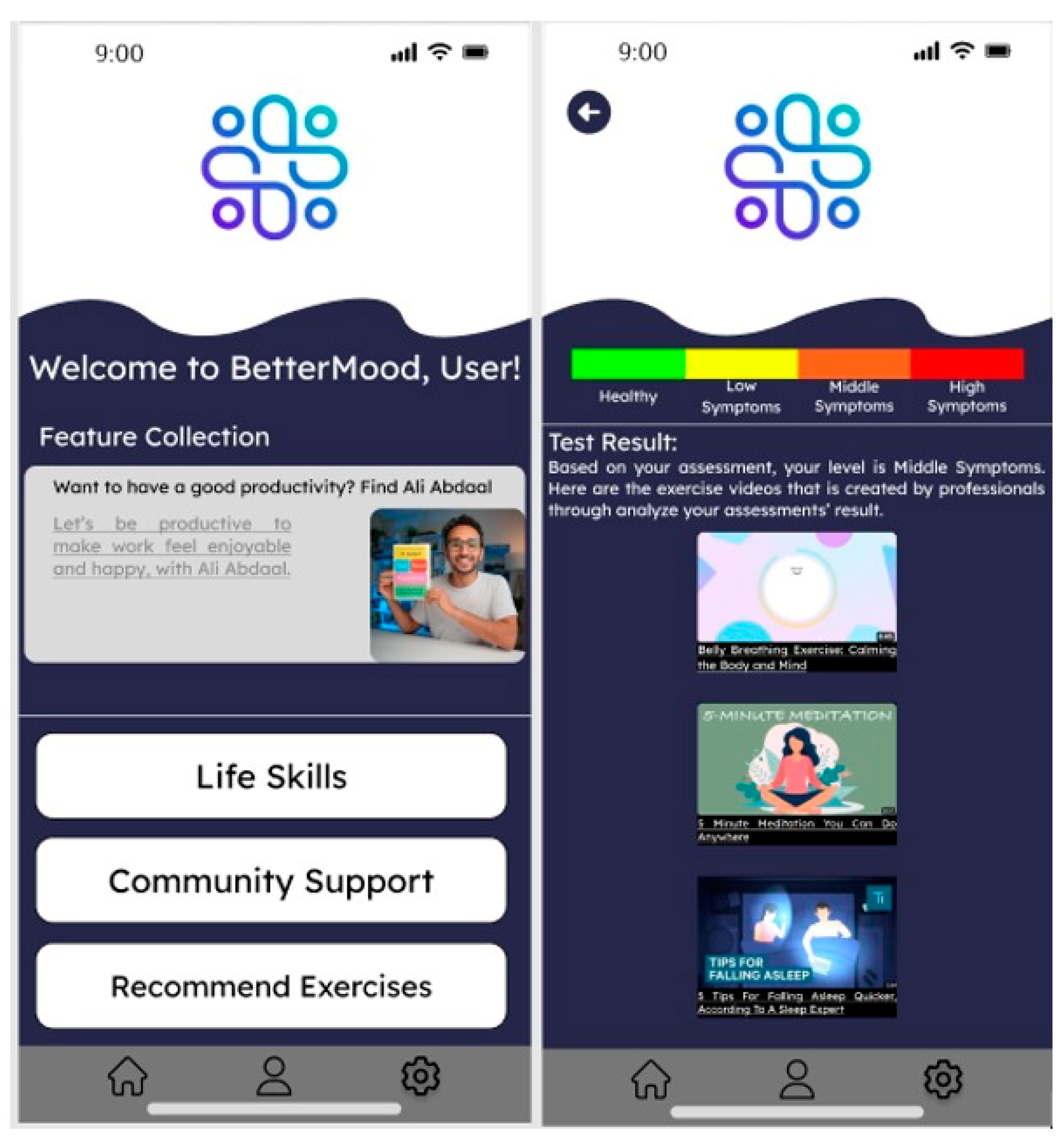
Above, when Recommend Exercises is clicked by the user, the application will give the user an interface to recommend courses and suggestions based on the Test Result given by professional which is mentioned in figure 9. When we created this interface, we made the following user experience design points:
- A personalized welcome message: "User, Welcome to BetterMood!" is used on the home screen, which aids in constructing user connection and includes a precise definition of the features. "Life Skills", "Community Support", and "Recommended Exercises" are precise and convenient for users to navigate to their points of interest. Attractive visual effects are made on the featured series such as the image of one known as Ali Abdaal and a book suggests education material.
- Personalized content was adopted in the Recommended Exercises interface. The app personalizes exercise videos based on the user's assessment to provide a personalized experience. Visual health indicators are used. The health indicator bar at the top of the screen is of different colors and labels (Healthy, Low Symptoms, Medium Symptoms, and High Symptoms) to provide an immediate and intuitive view of the state of the user.
- The whole process from taking a test to receiving advice is smooth and logical, providing a satisfying experience for the user. Showing actionable items right after the test results, such as Recommended Exercises, engages users and encourages them to take action immediately.
Figure 9.
After done answering the assessment, users receive assessment report given by professional.
Figure 9.
After done answering the assessment, users receive assessment report given by professional.
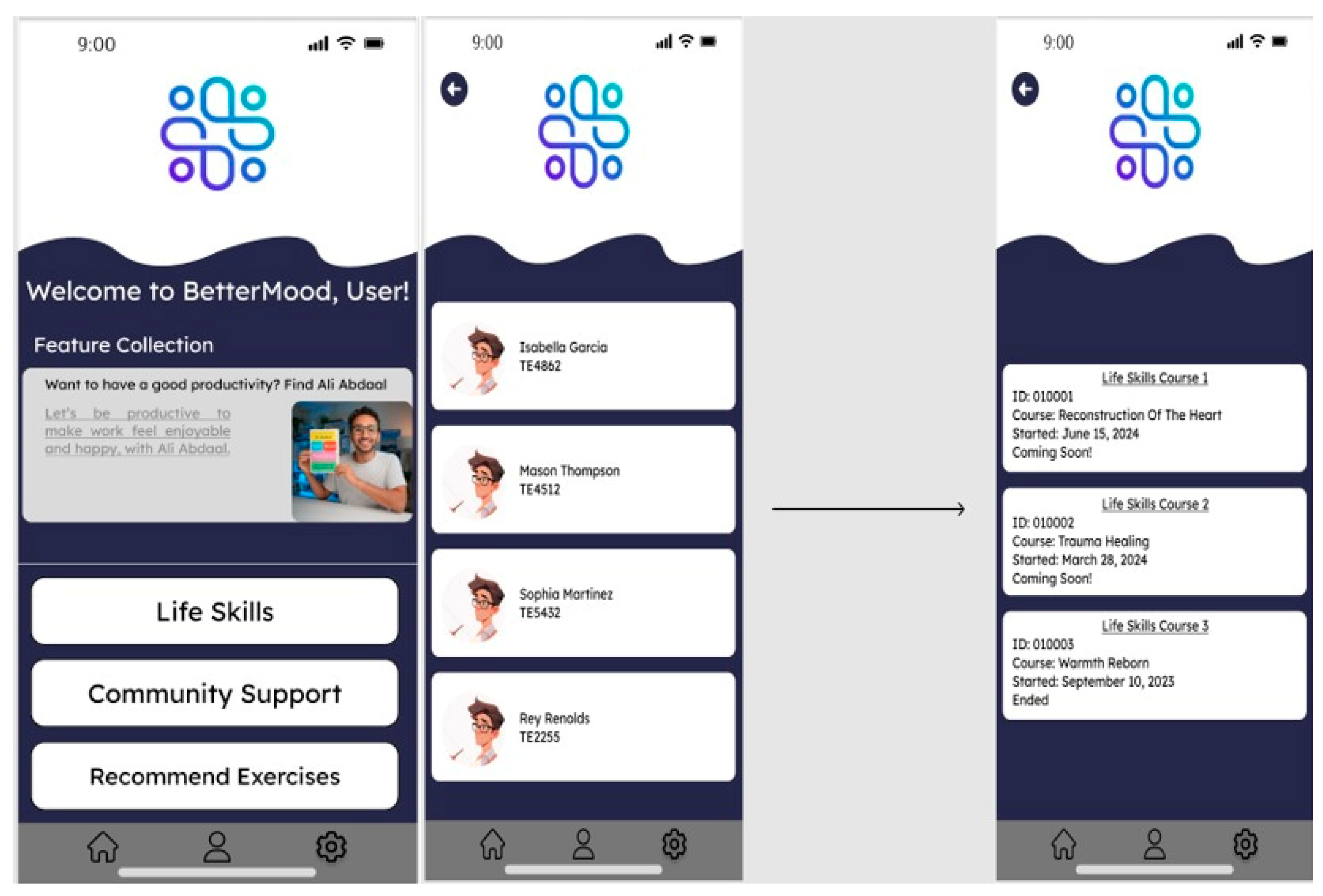
The below is an example where the user selects a course and enters it into the app is mentioned in figure 10. In creating this part of the user interaction design solution, we made the following user experience design points:
1. The courses are shown on the course selection page in a card format, a prevalent UI pattern for the whole process of item selection, allowing users to navigate and understand the available courses in a convenient way. The courses are provided with an ID, Title, and Start Date. All these are relevant information to the user to select one course to take. Using the "Coming Soon!" and "Ended" tabs gives users a clear understanding of availability of courses.
2. Simple-to-use structures, straightforward and easy-to-read information, and fewer design elements reduce the user's decision time and cognitive load. Font size is easily readable and the text contrast on the background looks sufficient for reading.
3. A common top-left back button on each page ensures similar navigation. Bottom navigation bar across screens is maintained, and buttons for Home, Search, and Settings are in the icons category. But inclusion of tabs may suit less icon-conscious users.
4. Visual Hierarchy. The title of the course is most prominent text, and it is helpful to draw the user's attention towards the most valuable information. Every course status ("Coming Soon!" Or "Ended") is highlighted, which is helpful to the users.
Figure 10.
Life Skills Teacher provide courses to improve users’ mental health.
Community Support Diagram
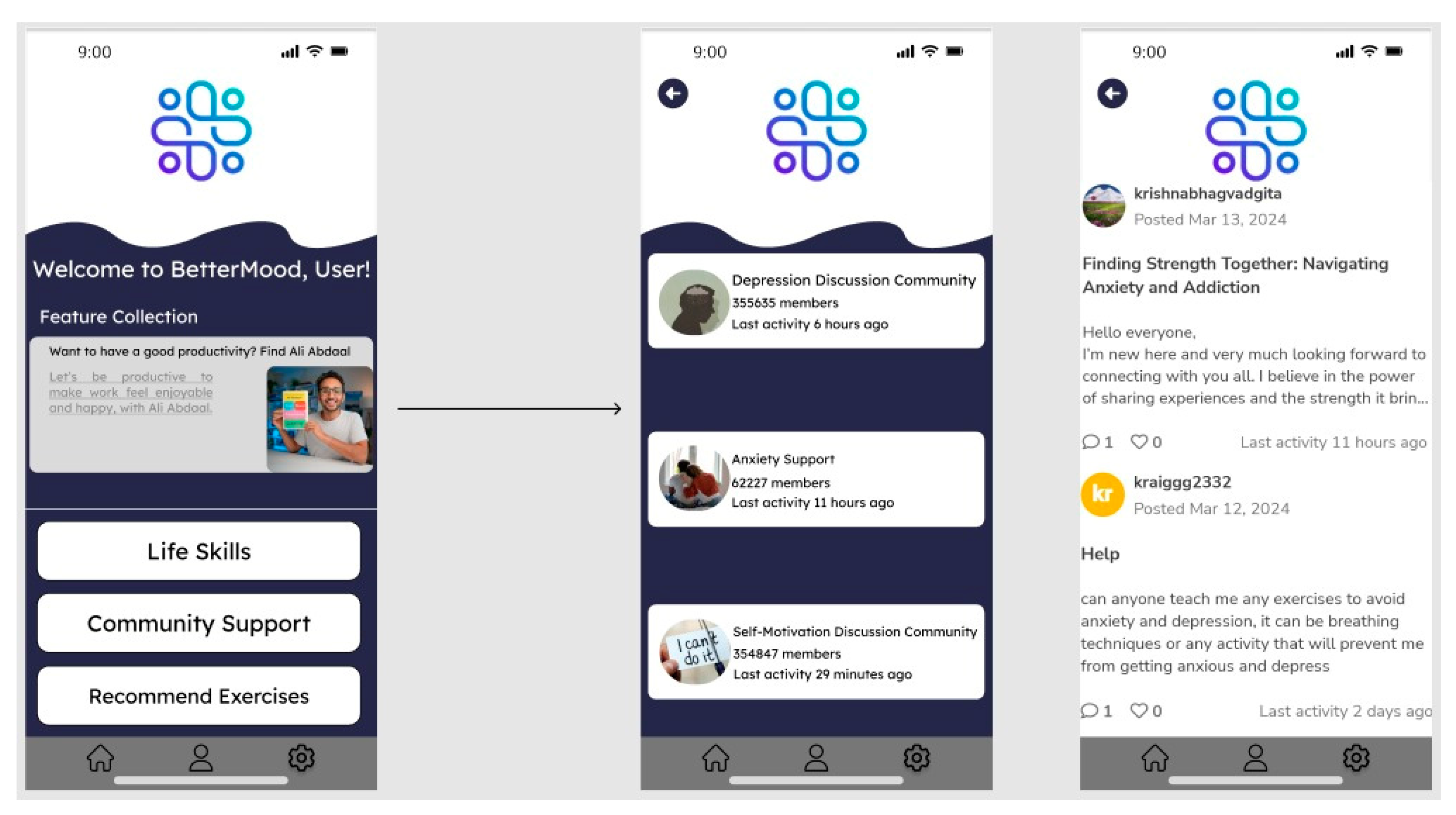
The below is an example where the user selects a community in the app and enters it is mentioned in figure 11. In creating this part of the user interaction design solution, we did the following user experience design points:
1. The community choice page shows a list of communities such as "Depression Discussion Community", "Anxiety Support", and "Self-Motivation Discussion Community". Each community has a card with a unique icon or image so that visual discrimination and quick identification are possible. Membership size and the timestamp of the last activity provide immediate feedback about the community size and activity level and help users make a decision about whether or not to join the community.
2. The Individual Communities view shows separate posts belonging to a community, with detail like username, postdate, post content, and engagement counts (likes and comments). Post content has clear visual hierarchy with title prominent first, then post body, then the engagement counts. User avatars and colour-coded distinct username add to social community feel.
3.Both the pages have a back button at the top left corner, following navigation consistency.
4.Both the layout and Visual Hierarchy are designed to be clean and simple with extra white space for easier navigation. The required information such as the name of the community and details of the last event are positioned clearly.
5.The layout is clean and readable, enhancing user readability.
6.Clear signals for interaction such as comments and likes encourage users to engage. Reaction button-supported posts are organically created to increase user interaction.
7.The design and color scheme of the app are applied consistently, strengthening brand identity and enhancing the user experience through recognition.
Figure 11.
Community Support to help out & support the users.
Software Testing Strategy
In this project the user utilizes the app in the subsequent functions, account registration and login function, user access to the community function, user participation in the course function, user participation in the test function, language setting function, we have created a comprehensive test plan for the app and the plan is institutionalised as below:
A. Account Registration and Login Functionality
1. Unit Testing
Write tests for individual components such as form validation, input fields, button states, and error message rendering. Use white box testing techniques to ensure that all logic paths are executed. Use Jest for JavaScript or JUnit for Java to test the logic of input validation. These are selected because they have huge assertion libraries and mocking support, which are necessary for isolating the code.
2. Integration Testing
Test registration/login form interaction and backend system interaction for account creation and authentication. Ensure sessions are correctly managed between different app components. Here, Postman is used to test API endpoints for user creation and authentication, ensuring the requests and responses are in anticipated formats.
3. System Testing
Carry out end-to-end testing to cover the whole workflow of registration and login, together with any third-party authentication integrations. Selenium WebDriver is used to automate browser interactions, simulating real user behaviour due to its wide support for different browsers and operating systems.
4. Acceptance Testing
Conduct user acceptance testing with a focus group to guarantee the usability and user experience of the login and registration process. Tools like TestRail are convenient in structuring and tracking acceptance tests, allowing non-technical stakeholders to participate easily and provide feedback.
- Agile Methodology: Reflect iterative cycles of testing, allowing for the rapid response to feedback and continuous improvement of the registration and login functionality. Utilize daily stand-ups to align the testing team with development and user feedback.
- Black-Box Testing: Design test cases based on functionality without knowing the internal processes. For example, attempt various inputs by the user for registration and login and observe how the system responds in different scenarios.
- B. Community Access Functionality
1. Unit Testing
Test each UI component, such as community listings, posting submission, and search functionality individually. React Testing Library will be utilized for React components to verify if they are rendering correctly after user interaction. This is selected because it is compatible with real DOM APIs and is suitable for applications built using React.
2. Integration Testing
Ensure communication between the client application and backend services, including correct querying and data retrieval. Mockito will be used in Java applications to mock such service interactions, with correct data handling without the need for actual servers.
3. System Testing
Run large-scale tests simulating user activity within the community, for example, reading, posting, and responding. Cypress is selected here since it offers full-stack testing, the debugging is extremely easy, and since it runs natively within the browser, so it seems more suitable to new web applications.
4. Acceptance Testing
Real users will be employed for testing community features to assess intuitiveness and levels of engagement. User Testing platforms will be utilized to gather qualitative user feedback and confirm the overall community engagement process.
5. Agile Methodology
Utilize a sprint-based testing approach, with each sprint committed to a set of community features. Foster collaboration between developers, testers, and product owners to enhance user stories and acceptance tests.
6. Black-Box Testing
Perform exploratory testing to simulate user action within community interactions. Test the system's response to posting, commenting, and searching without prior knowledge of the codebase.
Course Participation Functionality
- 1.
- Unit Testing
Test the course selection interface, video player components, and any quizzes or interactive elements separately. Components like the course selection interface, video player, and quizzes will be tested using XCTest for iOS to ensure each element's functionality is up to par in the app environment.
- 2.
- Integration Testing
Verify the integration between the course content delivery system and the user interface, ensuring seamless content streaming and interaction recording. For ensuring seamless streaming and content interaction, network traffic monitoring tools such as Charles Proxy will be employed to inspect the communication between the app and backend systems.
- 3.
- System Testing
Test complete course enrolment and participation scenarios, including course completion and tracking of user progress. BrowserStack will be used for cross-browser and device testing to validate the consistency and responsiveness of the course materials across all platforms.
- 4.
- Acceptance Testing
Collect feedback from users on the learning experience and content navigation. Feedback on the learning experience will be collected using tools like SurveyMonkey, which allows for creating detailed surveys to understand user satisfaction levels with course content and usability.
- 5.
- Agile Methodology
Use retrospective meetings at the end of each testing sprint to gather insights and improve the testing process. This ensures the course participation features are refined based on user feedback and test results.
Black-Box Testing
Conduct scenario-based testing to cover various user journeys in course participation, such as enrolling in a course, watching videos, and completing quizzes, ensuring the user experience is intuitive and error-free.
User Assessment Functionality
a. Unit Testing
Test the logic of the assessment algorithms and the presentation of the results. The logic of the assessment algorithms and how results are presented will be tested using Py Test for Python applications. It's selected because it is easy to use and has a wide range of libraries to assert test conditions.
b. Integration Testing
Assess how the system stores user responses and calculates results, for example, the course or exercise recommendation engine. To test RESTful APIs for storing and processing user responses, Newman can be used to run Postman collections in the command line for automated integration testing.
c. System Testing
Confirm the overall evaluation process, starting from assessment being taken until getting suggestions. Angular applications shall leverage Protractor to perform user interaction testing under the assessment capability due to its in-depth AngularJS application support.
d. Acceptance Testing
Make users complete tests so that results and recommendations are valid and relevant. Remote user testing will be done via Lookback.io, real-time user behavior recorded, and comments as they go through the test process in order to ensure results and recommendations are acceptable and effective.
e. Agile Methodology
Use continuous integration and continuous deployment (CI/CD) pipelines to ensure that new changes in the assessment feature are tested and deployed efficiently. It facilitates rapid iteration and responsiveness to change.
f. Black-Box Testing
Use equivalence partitioning and boundary value analysis to create test cases for the assessment feature, ensuring that the system correctly captures user feedback and provides appropriate feedback.
Language Setting Functionality
A. Unit Testing
Make sure each language option works, and all application content is translated correctly. The Jasmine library will be employed to test for changes in language settings in JavaScript code. Jasmine is chosen based on its BDD capabilities and ease of writing specs for varying scenarios.
B. Integration Testing
Verify how the selection of spoken language interacts with application settings and ensure it is remembered between sessions. Utilities such as Dragonfly can verify that the server responds correctly to configure to the language parameters and that language preferences are dealt with appropriately in server communications.
C. System Testing
Test the application using different languages to test that all of the content is being displayed properly. Because of its strong GUI testing feature, Test Complete will be the initial go-to tool to check language switching throughout the whole interface of the app.
D. Acceptance Testing
Have every native speaker of each language review to ensure correct translations and proper content arrangement. Public testing environment Applause will check language functionality using a couple of dozen languages' native speakers to guarantee the correctness of translations and their applicability to various cultures.
E. Agile Methodology
Engage a representative group of stakeholders, e.g., users with different language backgrounds, to define requirements and give feedback regarding the language setting feature. The diversity helps to hone the feature to meet different needs.
F. Black-Box Testing
Test the app's usability among native speakers of the languages supported by the app. This method guarantees that the app's translation preferences are user-friendly as well as ensuring that whatever changes are made to the language are correctly displayed at all times is mentioned in table 1 and table 2.
Test Plan
Use Case Description

Table 1.
Use Case Table Description of BetterMood.
| Use Case Name | Basic Flow @ Happy Path |
Alternative Flow @ Alternative Path |
Exception Flow @ Exception Pathway |
|---|---|---|---|
| User Registration | User opens system, enters personal info, sets password, and registers. | Users are confused during registration and seek help from administrators. | Registration fails due to invalid personal info or incorrect password format. |
| User Login | User enters login info and accesses system. | User resets forgotten password. | Login fails due to incorrect credentials. |
| User Payment | User selects payment method and completes payment. | User changes payment method. | Payment fails due to incorrect details or technical issues. |
| User-Selected Communities | User accesses community support and selects a community. | Users have doubts and administrators are there to help choose the community and answer them. | Community options fail to load, or selection error occurs. |
| User-Selected Courses | User accesses courses and selects a course. | Users with doubts are assisted by administrators in selecting courses and answering their doubts. | Course listing error or selection error occurs. |
| User Participation in Evaluation | User takes and confirms assessment for results. | User changes answers pre-confirmation. | Assessment fails to submit or invalid answers. |
Use Case Specifications
- 1.
- User Registration
Name: User Registration.
Description: This use case outlines the process for a new user to register an account in the system.
Author(s): Development group.
Actor(s): New User.
Location(s): Registration page on the system's user interface.
Status: Active.
Priority: High.
Assumption(s):
- 1.
- The user has access to the internet and the registration page.
- 2.
- The user has all the necessary personal information ready.
Precondition(s): User is at the registration page and has not logged in.
Postcondition(s): User has a registered account and can now log in.
Primary (Happy) Path:
- 1.
- User opens the system.
- 2.
- User enters personal information.
- 3.
- User sets a password.
- 4.
- User completes the registration.
Alternate Pathway(s): Users are confused during registration and seek help from administrators.
Exception Pathway(s): Registration fails due to invalid personal information or incorrect password format.
- 2.
- User Login
Name: User Login.
Description: This use case describes the process by which an existing user logs into the system.
Author(s): Development group.
Actor(s): Returning User.
Location(s): Login page on the system's user interface.
Status: Active.
Priority: High.
Assumption(s):
- 1.
- The user has an existing account with a username and password.
- 2.
- The login page is functioning properly.
Precondition(s): User has a registered account and is at the login page.
Postcondition(s): User is logged in and gains access to the home page.
Primary (Happy) Path:
- 1.
- User navigates to the login page.
- 2.
- User enters login credentials.
- 3.
- System validates credentials.
- 4 .
- User is granted access to the system.
Alternate Pathway(s): User resets forgotten password.
Exception Pathway(s): Login fails due to incorrect credentials.
- 3.
- User Payment
Name: User Payment.
Description: This use case details the process that allows the user to make a payment within the system.
Author(s): Development group.
Actor(s): Verified User.
Location(s): Payment page on the system's user interface.
Status: Active.
Priority: High.
Assumption(s):
- 1.
- The customer's payment method is legitimate.
- 2.
- The payment gateway functions and is safe.
- 3.
- Precondition(s): The user has chosen a product or service they want to buy and is logged in.
- 4.
- Postcondition(s): the client receives access to premium amenities or amenities once payment has been received.
Primary (Happy) Path:
- 1.
- User chooses a payment option.
- 2.
- User enters payment details.
- 3.
- Payment is processed and accepted.
- 4.
- User receives confirmation of successful payment.
Alternate Pathway(s): User changes payment method.
Exception Pathway(s): Payment fails due to incorrect details or technical issues.
- 4.
- User Chooses Community
Name: User Chooses Community.
Description: This use case outlines how a user selects a community to join and participate in.
Author(s): Development group.
Actor(s): Logged-in User.
Location(s): Community selection page on the system's user interface.
Status: Active.
Priority: Medium.
Assumption(s):
- 1.
- There are several communities to select from.
- 2.
- The user wants to become a part of a community.
Precondition(s): The user is exploring the community choices while logged in.
Postcondition(s): The user become a member of a group.
Primary (Happy) Path:
- 1.
- The user looks at the communities that are offered.
- 2.
- The user chooses a group.
- 3.
- The user gets integrated into the group.
Alternate Pathway(s): Users have doubts and administrators are there to help choose a community.
Exception Pathway(s): Community options fail to load, or selection error occurs.
- 5.
- User Choose Course
Name: User Chooses Course.
Description: This use case documents the steps a user takes to select a course for learning.
Author(s): Development group
Actor(s): Logged-in User seeking education.
Location(s): Course catalogue on the system's user interface.
Status: Active.
Priority: Medium.
Assumption(s):
- 1.
- A variety of courses are offered and accessible.
- 2.
- The user has the requisite level for the courses they are interested in.
Precondition(s): User is logged in and at the course selection page.
Postcondition(s): User is enrolled in a course.
Primary (Happy) Path:
User browses the course catalogue.
- 1.
- User selects a desired course.
- 2.
- User enrols in the course.
Alternate Pathway(s): Users with doubts about course selections are assisted by administrators.
Exception Pathway(s): Course listing error or selection error occurs.
- 6.
- User Participates in Assessment
Name: User Participates in Assessment.
Description: This use case describes the user's engagement with an assessment tool to evaluate their knowledge or skills.
Author(s): Development group.
Actor(s): User undertaking evaluation.
Location(s): Assessment page within the system's user interface.
Status: Active.
Priority: Medium.
Assumption(s):
- 1.
- The user has knowledge or skills in the subject of the assessment.
- 2.
- The assessment tool is available and functioning.
Precondition(s): User has selected an assessment to take.
Postcondition(s): User has completed the assessment and received feedback.
Primary (Happy) Path:
- 1.
- User begins the assessment.
- 2.
- User completes and submits answers.
- 3.
- Assessment is graded.
- 4.
- Results and feedback are presented to the user.
Alternate Pathway(s): User changes answers pre-confirmation.
Exception Pathway(s): Assessment fails to submit or invalid answers are provided.
Test Table
Table 2.
Test Table Description of BetterMood.
| Use Case | Test Case | Description | Procedure | Expected Results |
|---|---|---|---|---|
| UC01: User Registration | TC01-1: Successful User Registration. | New user registers successfully providing all required information. | Follow UC01 normal flow with valid username "New User", a strong password "Pass123!", and other required information. | User should be registered successfully and directed to a confirmation page. |
| TC01-2: User Registration with Missing Information. | New user attempts to register without providing all required information. | Attempt to register with username "New User” but omit the password field. | The system should prevent the registration and display an error message about missing information. | |
| TC01-3: User Registration with Weak Password. | New user attempts to register with a password that doesn't meet security requirements. | Follow UC02 normal flow with username "New User" and a weak password "Pass". | The system should reject the weak password and prompt the user to create a password that meets the security criteria. | |
| UC02: User Login | TC02-1: Successful User Login. | User logs in successfully supplying username and password. | Follow UC02 normal flow with username "Test User" and password "Test Password". | User should be logged in and directed to the home page. |
| TC02-2: User Login with Incorrect Password. | User attempts to login with a correct username but incorrect password. | Follow UC02 normal flow with username "Test User" and password "Wrong Password". | The system should display an error message about incorrect credentials. | |
| TC02-3: User Login with Inactive Account. | User attempts to login with an account that has not been activated. | Follow UC02 normal flow with username "Inactive User" and the correct password. | The system should inform the user that the account is inactive and provide steps for activation. | |
| UC03: User Payment | TC03-1: Successful User Payment. | User successfully completes a payment transaction. | Follow UC03 normal flow where user enters valid payment details and confirms the transaction. | The payment should be processed successfully, and the user should receive a confirmation message. |
| TC03-2: User Payment with Invalid Card Details. | User enters invalid credit card information for payment. | Attempt to make a payment with an incorrect credit card number. | The system should reject the transaction and notify the user of the invalid card details. | |
| TC03-3: User Payment with Insufficient Funds | User attempts to make a payment with a card that has insufficient funds. | Follow UC03 normal flow with a valid card that lacks sufficient funds. | The system should decline the payment and display a message about insufficient funds. | |
| UC04: User Chooses Community | TC04-1: Successful Community Selection. | User selects a community to join successfully. | Follow UC04 normal flow where user chooses an available community and clicks 'Join'. | User should be added to the community and redirected to the community page. |
| TC04-2: User Chooses Full Community. | User attempts to join a community that is at full capacity. | Select a community marked as 'Full' and attempt to join. | The system should inform the user that the community is full and suggest other communities. | |
| TC04-3: User Chooses Inactive Community | User selects a community that is no longer active. | Attempt to join a community marked as 'Inactive'. | The system should prevent the user from joining and explain that the community is no longer active. | |
| UC05: User Chooses Course | TC05-1: Successful Course Enrolment. | User successfully enrols in a course. | Follow UC05 normal flow where user selects a course and clicks 'Enrol'. | The user should be enrolled in the course and receive a message confirming the enrolment. |
| TC05-2: User Chooses Course Without Prerequisites. | User attempts to enrol in a course without completing the necessary prerequisites. | Select a course that has prerequisites which the user has not completed and attempt to enrol. | The system should block the enrolment and notify the user about the prerequisite requirements. | |
| TC05-3: User Chooses Course at Maximum Capacity. | User tries to enrol in a course that has reached maximum capacity. | Try to enrol in a course marked as 'Full'. | Enrolment should be prevented, and the user should be informed that the course is at full capacity. | |
| UC06: User Participates in Assessment | TC06-1: Successful Assessment Completion. | User completes an assessment successfully. | Follow UC06 normal flow to complete all questions in an assessment and submit. | The assessment should be submitted, and the user should receive a score. |
| TC06-2: Assessment Attempt with Time Expiration. | User attempts to complete an assessment but runs out of time. | Start the assessment and let the allotted time expire before submitting. | The system should automatically submit the user's progress, and the user should be informed that the time has expired. | |
| TC06-3: Technical Issue During Assessment. | User encounters a technical issue while taking an assessment. | During an assessment, simulate a technical issue such as a page refresh or system error. | The system should save the user's progress, allow them to restart the assessment from where they left off, or provide an error message with instructions. |
Risk Management Plan
Every venture with an aspiration to thrive must have a risk management plan, but when it comes to software development, it is even more crucial due to the complexity of interacting parts and evolving technologies. It must have a comprehensive risk mitigation plan to address the likely threats associated with technological development, project size, and business goals.
Risk Identification begins with the identification of potential technological, project, and business risks. Technology risks include the integration of new technology that will make the current tech stack outdated and the challenge of supporting multiple platforms, which will complicate code management and UI consistency. Project risks revolve around system scalability, as the application may require refactoring to support growing user loads, and the availability of skilled developers to implement new features or new technology. Business risks originate from market evolution, whereby changing trends can make the app's features outdated, and competition, where newer or improved apps can influence user retention and market share.
Mitigation Strategies are necessary to manage these risks. To mitigate technological risks, one should keep themselves updated with the latest technological developments and allot time for research and development. Utilizing cross-platform technologies, such as React Native or Flutter, can minimize platform-specific code changes, fostering consistency across devices. For project risks, to enhance scalability, community-driven designs can be utilized and the system architecture can be kept flexible. It's also required to invest in team development so that the team members can adapt to various tasks and technologies. To mitigate business risks, frequent user feedback sessions and market analysis will keep the app relevant and valuable. Also, having a feature flagging system in place allows us to respond rapidly to competitors' promotions, with the capacity to turn features on or off without deploying new code.
Optimization Techniques include leveraging app system prototyping to visualize designs and workflows in advance, so that any issues of user experience can be realized early, before complete development. A user-testing phase with prototypes can validate concepts and verify that they meet user requirements. Employing an incremental delivery approach using agile methodologies allows features to be released incrementally, lowering risks associated with large-scale changes. Employment of a CI/CD pipeline (Continuous Integration/Continuous Deployment) ensures frequent releases and reduces the impact of change. Feature-driven development, in which business-priority features are given precedence, ensures that the most important aspects are dealt with first.
Regular Reviews and Adjustments are needed to ensure proactive risk management. Having regular risk assessment meetings ensures that risks are continuously monitored and revised. The risk management plan should be updated in accordance with these reviews in order to continue being responsive to emerging issues.
Communication Plan is also important in informing stakeholders regarding potential risks and how they are going to be mitigated. Up-to-date information and recording facilitate the availability of all stakeholders with respect to the latest risks. Establishing open communication lines facilitates effective provision that important information about risks is channelled quickly to decision-makers. By identifying likely risks early and employing the above mitigation and optimization procedures, the project can better prepare for uncertainties, leading to a more stable and adaptable process of development.
Maintenance and Evolution Plan
To come up with a thorough maintenance and evolution plan for the BetterMood application, there are several key areas to be carefully addressed. Initial Codebase Evaluation is about deeply reviewing the initial codebase of the application to pinpoint areas where it can be maintained and improved. It is critical to identify portions of the code that could prove hard to read, change, or extend and start making preparations to make such areas easy to change in the future. Maintainability Prediction entails the use of software measurement and analysis methodology to estimate the lifespan of various aspects of the application. Identifying components which, in addition to customer feedback and market direction, will be more frequently subject to update or modification will be the most return from maintenance activity. System Change Prediction is achieved by conducting market research and gathering user feedback to predict expected system changes and new feature requirements. Planning and prioritizing future changes based on user needs and business goals require stakeholder collaboration. Estimating Maintenance costs is crucial to plan and budget for. Based on historical experience and industry norms, overall maintenance spending of BetterMood can be approximated for an interval (e.g., annual). Such estimation needs to consider bug fixes, updates, introducing new features, refactoring activities, and other support needs on an ongoing basis.
Software Refactoring and Reengineering is designed to improve the maintainability of the application over the long term. Developing software refactoring and reengineering strategies guarantees that technical debt is addressed, code quality is improved, and maintenance overhead is minimized. Refactoring sessions must be scheduled periodically to provide for the long-term health of the codebase.
Post-Deployment Activities Plan includes the creation of complete procedures for each post-deployment activity, such as version maintenance, bug tracking, problem solving, and distribution management. Certain roles and responsibilities will be reserved for development team members involved in development, fixes, and routine maintenance to facilitate smooth operation. Ongoing development and automated inspection processes shall be utilized to maintain code quality and reliability during upgrades and modifications.
Documentation and Knowledge Sharing are essential for successful maintenance. Existing documentation, including architecture diagrams, code comments, user documentation, and release notes, need to be retained. Encouraging knowledge sharing as a culture within the development team ensures that everyone in the team possesses a perception of the codebase and is capable of contributing successfully to maintenance and evolution activities.
Feedback Loop and Continuous Improvement emphasize putting into place a feedback loop that encompasses users, stakeholders, and in-house teams for gaining feedback and suggestions for the improvement of the BetterMood app. Agile development practices and agile methodology should be put in place for incrementally improving features, fixing issues, and including user feedback into future releases.
Through strict adherence to this comprehensive maintenance and development plan, BetterMood can be successfully maintained, upgraded, and enhanced to meet evolving user needs and market demands at lower maintenance cost and technical debt.
References
- Thesing, T. , Feldmann, C., & Burchardt, M. (2021). Agile versus Waterfall Project Management: Decision model for selecting the appropriate approach to a project. Procedia Computer Science, 181, 746–756. [CrossRef]
- Layton, M. C. , Ostermiller, S. J., & Kynaston, D. J. (2020). Agile project management for dummies, (3rd ed.). Wiley.
- Nasution, W. S. L. , & Nusa, P. (2021). UI/UX design web-based learning application using design thinking method. ARRUS Journal of Engineering and Technology, 1(1), 18–27. [CrossRef]
- Alomari, H. W. , Ramasamy, V., Kiper, J. D., & Potvin, G. (2020). A user interface (UI) and user experience (UX) evaluation framework for cyberlearning environments in computer science and software engineering education. Computers in Human Behavior, 107, 106274. ( 107, 106274. [CrossRef]
- Tsui, F. , Karam, O., & Bernal, B. (2022). Essentials of software engineering, Jones & Bartlett Learning.
- Dogra, V. , Singh, A., Verma, S., Kavita, Jhanjhi, N. Z., & Talib, M. N. (2021). Analyzing DistilBERT for sentiment classification of banking financial news. In S. L. Peng, S. Y. Hsieh, S. Gopalakrishnan, & B. Duraisamy (Eds.), Intelligent Computing and Innovation on Data Science (Vol. 248, pp. 665-675). Springer. [CrossRef]
- Alkinani, M. H. , Almazroi, A. A., Jhanjhi, N. Z., & Khan, N. A. (2021). 5G and IoT-based reporting and accident detection (RAD) system to deliver first aid box using unmanned aerial vehicle. Sensors, 21(20), 6905. [CrossRef]
- Babbar, H. , Rani, S., Masud, M., Verma, S., Anand, D., & Jhanjhi, N. (2021). Load balancing algorithm for migrating switches in software-defined vehicular networks. Computational Materials and Continua, 67(1), 1301-1316. [CrossRef]
- Saeed, S. , & Abdullah, A. (2021). Combination of brain cancer with hybrid K-NN algorithm using statistical analysis of cerebrospinal fluid (CSF) surgery. International Journal of Computer Science and Network Security, 21(2), 120-130. [CrossRef]
- Saeed, S. , & Abdullah, A. (2019). Analysis of lung cancer patients for data mining tool. International Journal of Computer Science and Network Security, 19(7), 90-105.
- Saeed, S. , Abdullah, A., Jhanjhi, N. Z., Naqvi, M., & Nayyar, A. (2022). New techniques for efficiently k-NN algorithm for brain tumor detection. Multimedia Tools and Applications, 81(13), 18595-18616. 1861. [Google Scholar] [CrossRef]
- Saeed, S. , Abdullah, A., & Naqvi, M. (2019). Implementation of Fourier transformation with brain cancer and CSF images. Indian Journal of Science & Technology, 12(37), 1-16. [CrossRef]
- Atlassian. (2019). Agile best practices and tutorials. https://www.atlassian.com/agile.
- Wrike. (2022). What is agile methodology in project management? https://www.wrike.com/project-management-guide/faq/what-is-agile-methodology-in-project-management/.
- Hoory, L. , & Bottorff, C. (2022). Agile vs. Waterfall: Which project management methodology should I use? Forbes Advisor, https://www.forbes.com/advisor/business/agile-vs-waterfall-methodology/.
- Lockhart, L. (2023). Agile vs. Waterfall: 10 key differences between the two methods. Float, https://www.float.com/resources/agile-vs-waterfall/.
- Trapani, K. (2018). What is agile/Scrum. cPrime, https://www.cprime.com/resources/what-is-agile-what-is-scrum/.
- Gill, S. H. , Razzaq, M. A., Ahmad, M., Almansour, F. M., Haq, I. U., Jhanjhi, N. Z.,... & Masud, M. (2022). Security and privacy aspects of cloud computing: a smart campus case study. Intelligent Automation & Soft Computing, 31(1), 117-128. [CrossRef]
- Muzafar, S. , & Jhanjhi, N. Z. (2020). Success stories of ICT implementation in Saudi Arabia. In Employing Recent Technologies for Improved Digital Governance (pp. 151-163). IGI Global. [CrossRef]
- Shah, I. A. , Jhanjhi, N. Z., & Laraib, A. (2023). Cybersecurity and blockchain usage in contemporary business. In Handbook of Research on Cybersecurity Issues and Challenges for Business and FinTech Applications (pp. 49-64). IGI Global. [CrossRef]
- Aldughayfiq, B. , Ashfaq, F., Jhanjhi, N. Z., & Humayun, M. (2023). Explainable AI for retinoblastoma diagnosis: interpreting deep learning models with LIME and SHAP. Diagnostics, 13(11), 1932. [CrossRef]
- Jena, K. K. , Bhoi, S. K., Malik, T. K., Sahoo, K. S., Jhanjhi, N. Z., Bhatia, S., & Amsaad, F. (2022). E-learning course recommender system using collaborative filtering models. Electronics, 12(1), 157. [CrossRef]
- Alferidah, D. K. , & Jhanjhi, N. Z. (2020, October). Cybersecurity impact over bigdata and iot growth. In 2020 International Conference on Computational Intelligence (ICCI) (pp. 103-108). IEEE.
- Jhanjhi, N. Z. , Humayun, M., & Almuayqil, S. N. (2021). Cyber security and privacy issues in industrial internet of things. Computer Systems Science & Engineering, 37(3). [CrossRef]
Figure 1.
User And Registration Sequence Diagram of BetterMood.
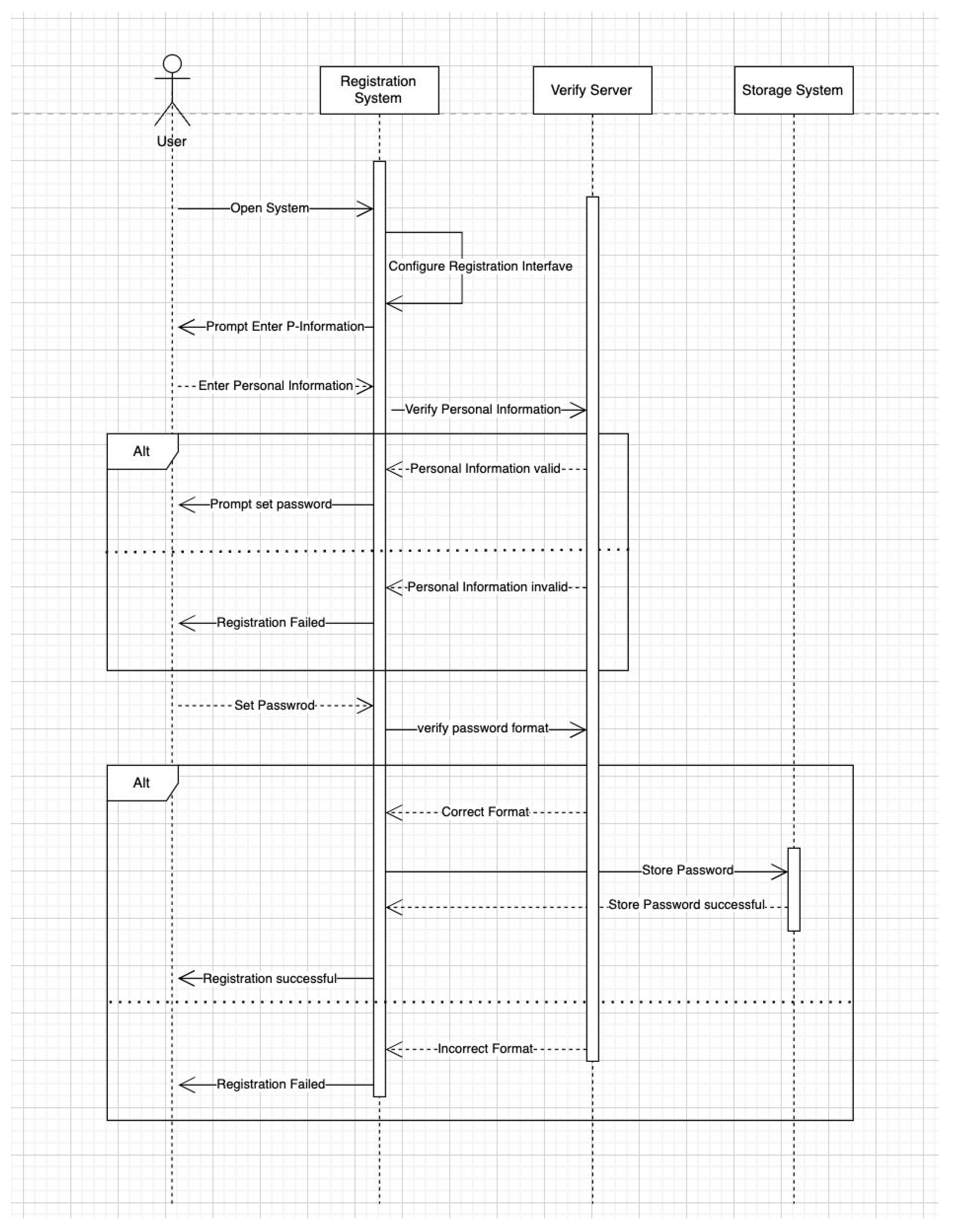
Figure 2.
User and Payment Sequence Diagram of BetterMood.
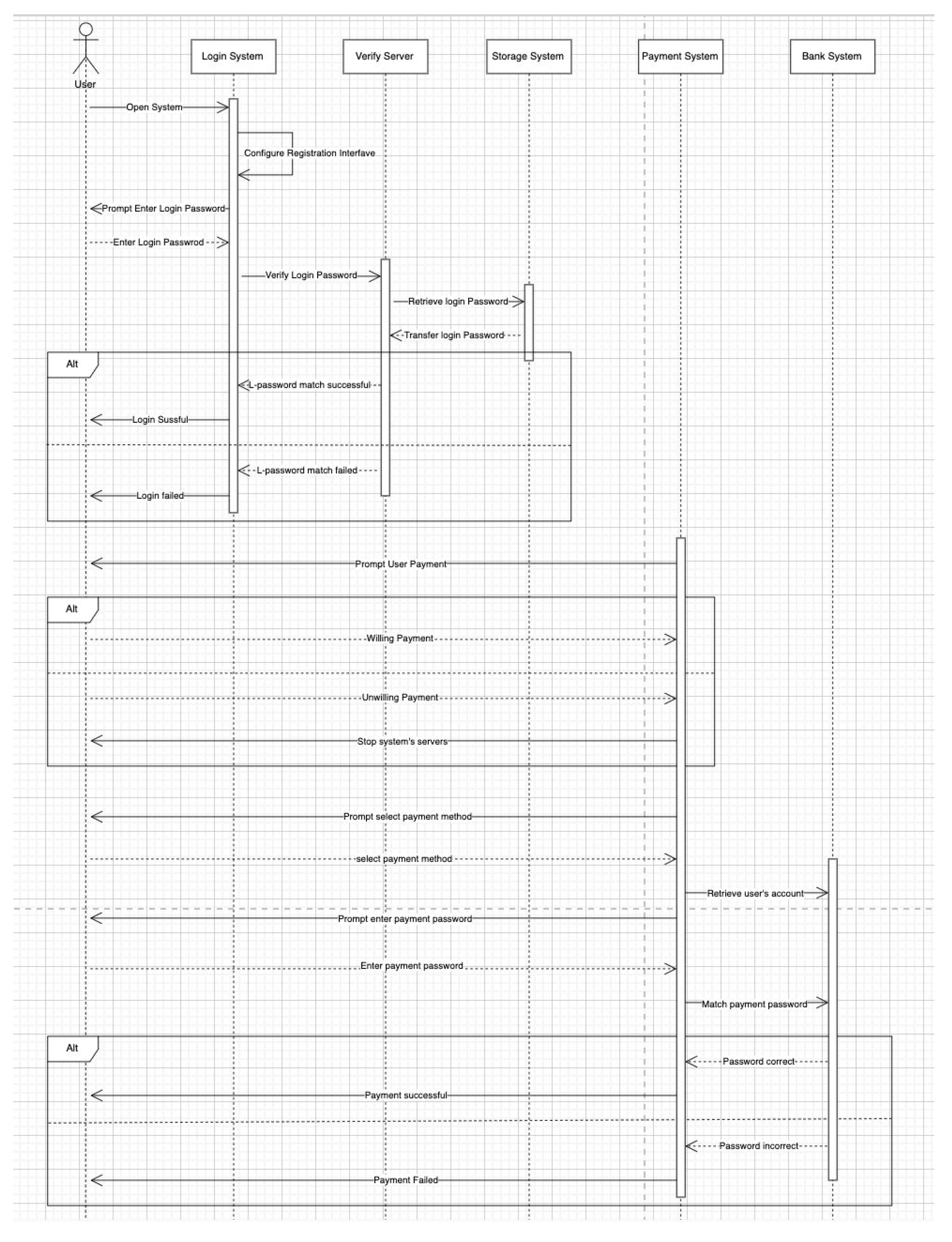
Figure 3.
Activity Diagram of BetterMood.
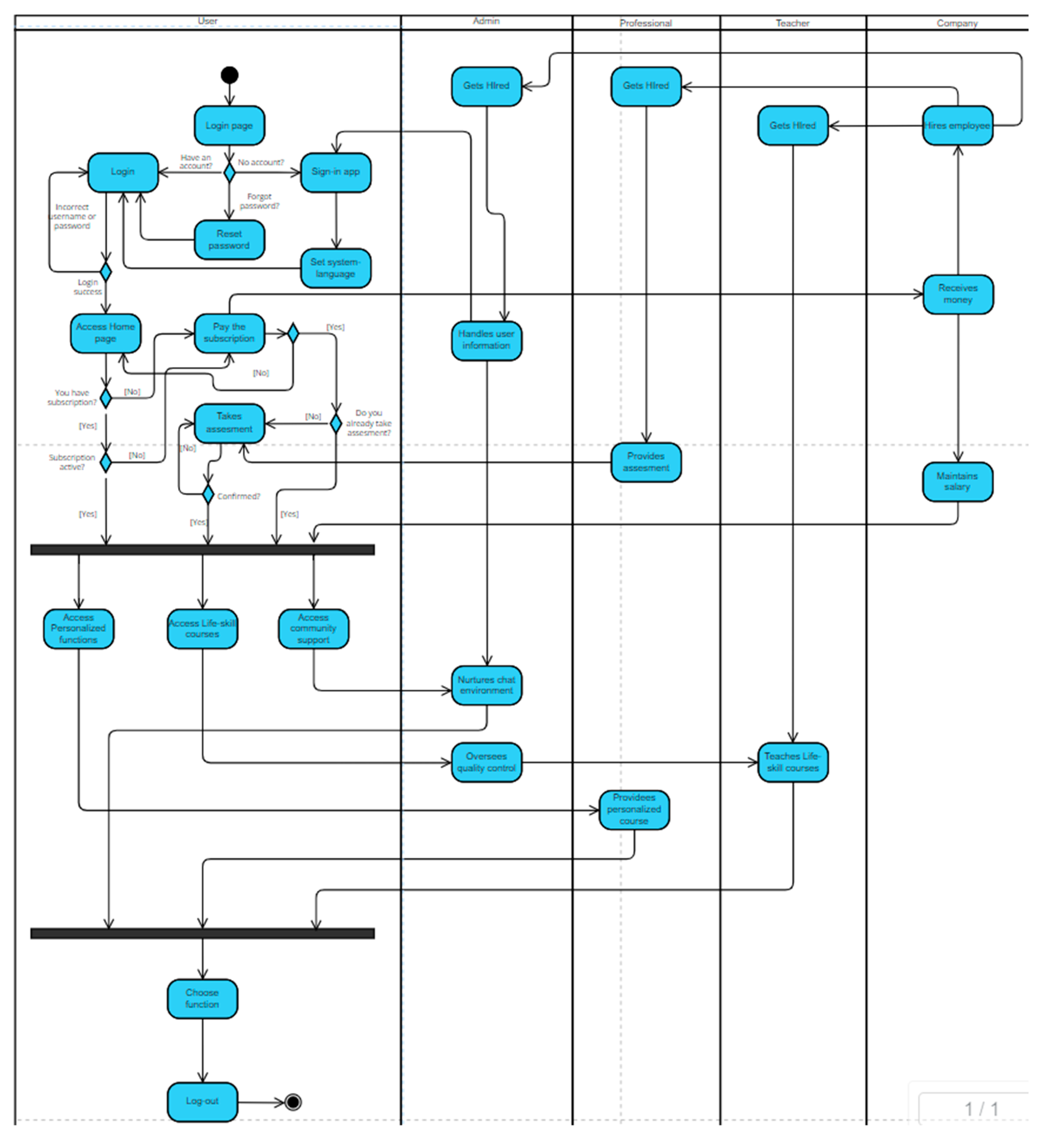
Figure 4.
State Chart Diagram of BetterMood.
Disclaimer/Publisher’s Note: The statements, opinions and data contained in all publications are solely those of the individual author(s) and contributor(s) and not of MDPI and/or the editor(s). MDPI and/or the editor(s) disclaim responsibility for any injury to people or property resulting from any ideas, methods, instructions or products referred to in the content. |
© 2025 by the authors. Licensee MDPI, Basel, Switzerland. This article is an open access article distributed under the terms and conditions of the Creative Commons Attribution (CC BY) license (http://creativecommons.org/licenses/by/4.0/).
Copyright: This open access article is published under a Creative Commons CC BY 4.0 license, which permit the free download, distribution, and reuse, provided that the author and preprint are cited in any reuse.


